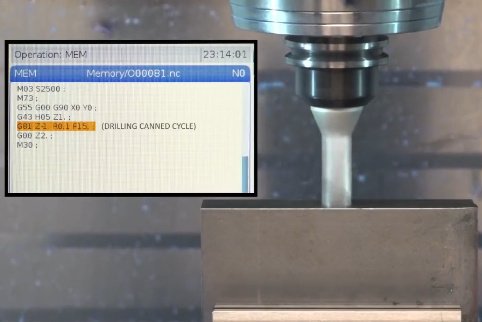
AI can generate G-code for CNC machining and is increasingly being integrated into CAM workflows. This article explains how AI-driven G-code generation works, how it compares with conventional CAM, what is required to use it safely, and how it fits into real-world machining environments.
What Is G-Code and Why It Matters in CNC Machining
G-code is the numerical control programming language used to command CNC machines. It defines machine motions, spindle behavior, coolant control, tool changes, and auxiliary operations. Reliable G-code is critical for part quality, tool life, cycle time, and machine safety.
In a CNC workflow, G-code links the virtual model and the physical machine:
- CAD defines geometry and design intent.
- CAM converts geometry into toolpaths.
- Post-processors translate toolpaths into machine-specific G-code.
- The CNC controller executes G-code to cut material.
Any AI system that “generates G-code” must either replace or augment part of this chain. It may interpret geometry, propose machining strategies, or optimize existing toolpaths before final G-code output.
Conventional vs AI-Assisted G-Code Generation
Traditional CAM relies on deterministic algorithms and extensive human input to create toolpaths. AI-assisted systems introduce data-driven models that learn from historical machining data, tool wear patterns, machine responses, and previous programs.
| Aspect | Conventional CAM | AI-Assisted Workflow |
|---|---|---|
| Programming basis | Explicit rules, fixed strategies, manual parameter tuning | Models inferred from past jobs, patterns, and optimization data |
| Operator involvement | High: strategy selection, stepovers, depths, sequencing | Medium: validate and adjust AI-suggested strategies and parameters |
| Adaptation to new parts | Requires manual setup and strategy changes | Can reuse knowledge from geometrically similar parts or materials |
| Optimization | Rule-based feeds/speeds, standard toolpaths | Dynamic feeds/speeds, path smoothing, and cycle-time reduction based on data |
| Machine-specific tuning | Done by programmers and NC engineers | Can be learned from machine logs, load curves, and feedback |
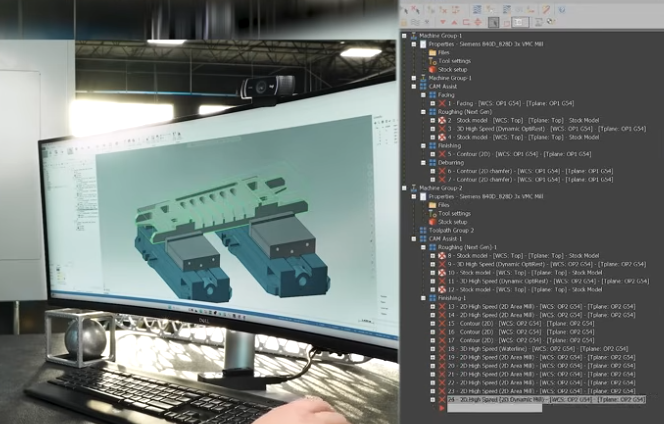
How AI Generates G-Code for CNC Machining
AI does not directly “guess” G-code line by line in professional environments. Instead, it operates within or alongside CAM and post-processing systems to generate valid and optimized output for specific machines.
AI-Driven Feature Recognition and Process Planning
AI can automatically interpret CAD models and associate them with machining operations.
- Identify features: holes, pockets, bosses, threads, chamfers, fillets, slots, ribs, undercuts.
- Classify features: blind vs through holes, open vs closed pockets, stepped vs tapered bores.
- Map features to operations: drilling, tapping, reaming, roughing, finishing, deburring, engraving.
- Assign tools: select drill diameters, end mills, chamfer tools, thread mills based on tool library.
Once features and operations are defined, the system can build a process plan: setup order, orientation, roughing-then-finishing strategy, and tool sequence. This plan is the basis for toolpath generation.
Toolpath Strategy Selection
AI models can choose among multiple toolpath styles depending on part geometry and material:
- 2D strategies: contouring, pocketing, slotting, facing.
- 3D strategies: Z-level roughing, parallel finishing, constant-scallop finishing, rest machining.
- High-speed machining (HSM): trochoidal milling, adaptive clearing, constant engagement paths.
For example, in a closed pocket in hardened steel, an AI system may favor an adaptive clearing toolpath with small stepovers and constant engagement to reduce tool breakage, followed by a finishing contour with a smaller radial DOC.
Feeds, Speeds, and Cut Parameter Optimization
Parameter selection directly influences productivity and tool life. AI-assisted systems can refine:
- Spindle speed (RPM) based on material, tool diameter, coatings, and desired surface speed.
- Feed rate (mm/min or in/min) based on chip load, flute count, and machine rigidity.
- Axial depth of cut (DOC) and radial stepovers for roughing vs finishing passes.
- Entry and exit strategies, like ramping, helical entry, and lead-in/out arcs.
Models may be trained using prior cutting data, tool wear tracking, and machine tool load curves to adjust feeds and speeds more aggressively than generic handbooks while maintaining safety margins.
Machine- and Controller-Specific Post-Processing
G-code syntax varies between controllers (Fanuc, Siemens, Heidenhain, Haas, etc.). AI is usually not responsible for encoding low-level differences; instead, standard post-processors do this. However, AI can assist by:
- Choosing suitable post-processors for the target machine.
- Suggesting safe default parameters such as work coordinate systems (e.g., G54), plane selection (G17, G18, G19), and canned cycles.
- Adjusting code style (e.g., using G2/G3 arcs vs linear interpolation) when supported by the controller.
After toolpath generation, the CAM system passes data into the post-processor, which outputs machine-ready G-code. AI may also post-process existing G-code for optimization or simplification.
Data and Configuration Required for AI G-Code Generation
Reliable AI-generated G-code depends on accurate, complete input data and well-configured systems. Missing or incorrect information increases risk.
CAD and Geometry Inputs
The quality of the CAD model defines how well AI can recognize features and generate toolpaths:
- Precise solid models with correct dimensions and tolerances.
- Clear indication of machining allowances, draft angles, and functional surfaces.
- Reference datums, coordinate systems, and orientation definitions.
When using AI on imported geometry (e.g., STEP, IGES), careful verification is needed to avoid hidden gaps, overlapping faces, or incorrect surface normals that could mislead feature recognition.
Material, Tooling, and Machine Libraries
AI needs structured databases to make informed decisions:
| Library Type | Key Parameters | Typical Examples |
|---|---|---|
| Material library | Hardness, tensile strength, machinability index, thermal conductivity, recommended surface speeds | Aluminum 6061-T6, AISI 1045, 316L stainless, Ti-6Al-4V |
| Tool library | Diameter, flute count, flute length, overall length, shank size, coating, maximum recommended DOC and feed | End mills, drills, reamers, thread mills, inserts, boring bars |
| Machine library | Max RPM, max feed rate, axis travels, acceleration, spindle power, tool changer capacity, coolant capabilities | 3-axis VMC, 5-axis trunnion, horizontal mill with pallet changer, mill-turn centers |
| Fixture and workholding | Clamping points, jaw geometry, interference zones, accessible faces | Vise setups, modular fixtures, tombstones, vacuum tables |
Well-maintained libraries allow AI models to select tools and parameters that are realistic for the actual shop environment.
Process Rules, Tolerances, and Quality Requirements
AI also needs process-level constraints:
- Tolerances for critical features (IT grades, positional tolerances, surface profile limits).
- Surface finish requirements (Ra, Rz) for each region.
- Maximum allowable deflection, chatter thresholds, and vibration constraints if monitored.
- Company standards for roughing allowances, finishing passes, and deburring rules.
The more explicit and structured these requirements are, the more predictably AI can respect them in the generated toolpaths and resulting G-code.
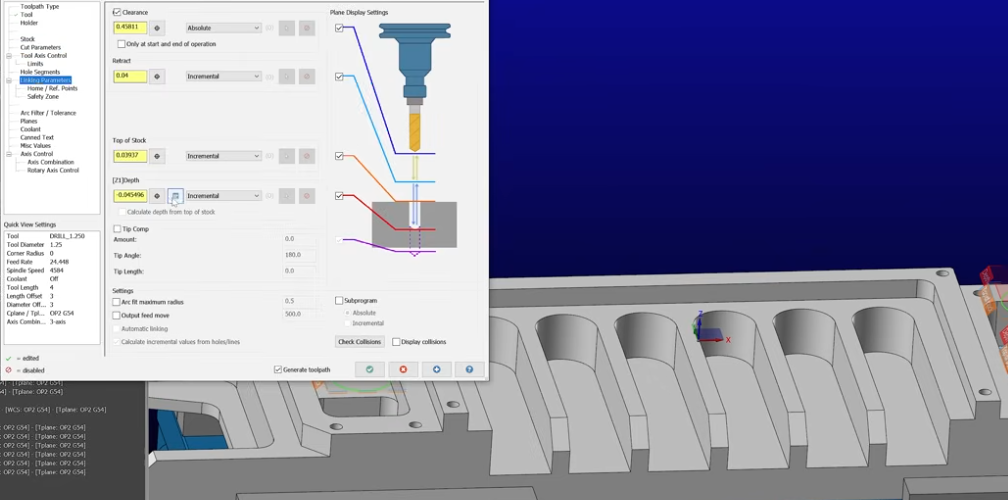
Workflows for AI-Based G-Code Generation
AI can be integrated into CNC workflows in several ways, from assisting with parameter selection to taking over most programming tasks under supervision.
AI as a Helper in Conventional CAM
In this approach, the human programmer still defines setups and basic strategies, while AI assists by:
- Auto-selecting tools from the library for recognized features.
- Proposing initial feeds, speeds, and DOC values based on material and previous jobs.
- Recommending toolpath styles based on geometry (e.g., adaptive vs traditional pocketing).
- Detecting potential collisions or over-engagement zones before simulation.
The programmer keeps full control and can accept, reject, or refine AI suggestions. Generated toolpaths are then post-processed as usual into G-code.
AI-Driven Automated CNC Programming
In more automated systems, the workflow can be:
- Import CAD model and define stock size or select from standard stock configurations.
- AI performs feature recognition and proposes a complete machining plan, including setups and operations.
- System automatically selects tools and generates full toolpaths.
- Post-processor produces G-code for specific machines.
- Human reviews toolpaths, runs simulation, and approves for production.
Such systems can significantly reduce programming time for repetitive parts or parts similar to those in the training dataset, but they still require human verification to avoid costly errors.
AI for Optimizing Existing G-Code
Another use case is optimizing pre-existing G-code rather than generating it from scratch. AI can:
- Analyze machine logs, load data, and cycle times from previous runs.
- Identify sections of code with low spindle load or underutilized feed rates.
- Suggest incremental increases in feed or depth of cut in low-risk segments.
- Reorder non-cutting moves to reduce air time without changing geometry.
Output may be a modified G-code program or parameter set that the programmer can compare against the original. This is often used in high-volume production where small improvements in cycle time have significant impact.
Practical Issues in AI G-Code Generation
While AI can streamline CNC machining programming, several practical issues need attention to ensure safe and reliable results.
Ambiguous or Incomplete CAD Models
AI feature recognition depends on clear geometry. Issues include:
- Missing fillets or chamfers that are required for functionality but not modeled.
- Unclear whether a face is as-cast, as-forged, or fully machined.
- Lack of tolerance or surface finish annotations leading to overly aggressive or conservative strategies.
In such cases, AI may propose toolpaths that either remove too much material or fail to meet quality requirements. Human review of design intent and drawing notes remains essential.
Tool and Holder Interference
Effective collision avoidance requires accurate representations of tools, holders, fixtures, and machine axes. If the tool library lacks correct holder geometries or stick-out lengths, AI collision checks may pass despite real interference risks.
Programmers must maintain:
- Precise tool assembly descriptions (tool + holder + extensions).
- Accurate fixture and workholding models.
- Machine envelope and travel limits aligned with reality.
Without these, AI-generated G-code can look correct in simulation but fail on the shop floor.
Machine Behavior Differences
Even with the same nominal specifications, two machines can behave differently due to wear, backlash, spindle condition, and control tuning. AI models trained on data from one machine may propose too aggressive parameters for another, especially older or less rigid equipment.
It is useful to:
- Tag data by machine when training performance models.
- Maintain conservative safety margins when deploying AI-generated parameters on new machines.
- Gradually ramp up aggressiveness with monitored trials instead of applying maximum predicted values immediately.
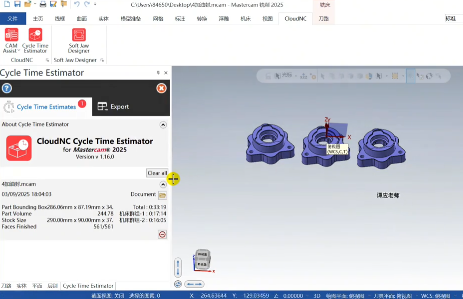
Verification, Simulation, and Safety Measures
Irrespective of who or what generates G-code, verification is mandatory. AI does not remove the need for simulation, proofing, and process control.
Toolpath Simulation and Material Removal
Simulation checks whether the toolpaths behave as expected:
- Visualize material removal to detect uncut areas or overcuts.
- Track stock evolution to avoid excessive engagement or unexpected plunges.
- Monitor collisions between tool, holder, and fixtures.
- Evaluate cycle time for each operation and setup.
AI-generated G-code should be run through the same simulation tools used for conventional CAM output, with equal scrutiny.
Machine-Specific Verification
Some environments use virtual machine simulation that mimics the exact kinematics and control behavior of a specific CNC. This is especially relevant for:
- 5-axis milling, where rotary motion and singularities need careful handling.
- Mill-turn centers, where spindle and turret synchronization is critical.
- Large machines, where travel limits, cable carriers, and special axes can cause unexpected collisions.
AI-based systems must integrate with such virtual machine models to ensure that G-code is safe when executed on the real machine.
Shop-Floor Testing and Process Control
Before full production, AI-generated programs should undergo staged validation:
- Dry runs above the part or with no workpiece loaded, to verify motion sequences.
- Cutting trials in soft material or scrap stock when possible.
- Incremental prove-out with conservative feeds and speeds, then gradual optimization.
Measurements of critical dimensions and surface finish after the first article provide feedback that can be used to refine AI decisions for future jobs.
When AI G-Code Generation Is Most Useful
AI is particularly effective in scenarios where patterns repeat and data is available.
High-Mix, Medium-Volume Jobs
Shops that frequently program similar part families (e.g., valve bodies, brackets, housings, manifolds) can benefit from AI that recognizes recurring features and reuses proven strategies. Reduced programming time per job accumulates over many parts.
Standardized Components and Features
In environments with recurring standard features—such as arrays of holes, standard keyways, or common pocket shapes—AI can quickly apply known combinations of tools and strategies, ensuring consistency between programs and programmers.
Cycle Time and Tool-Life Optimization
For production lines where parts run in large batches, AI can analyze historical machine and tool data to fine-tune feeds, speeds, and toolpaths, balancing the goals of minimal cycle time and acceptable tool life.
Capabilities and Limits of AI in G-Code Generation
Understanding what AI can and cannot do is key to using it effectively and safely.
Capabilities
- Automated feature recognition and mapping to machining operations.
- Tool selection based on material, geometry, and in-house tool libraries.
- Parameter optimization using data from past jobs, sensors, and machine logs.
- Assistance in choosing toolpath styles and operation sequences.
- Post-processing support by selecting appropriate posts and code styles.
- Optimization of legacy G-code for reduced cycle times and improved stability.
Limits
- Requires high-quality, representative training data for reliable parameter predictions.
- Cannot inherently understand design intent beyond what is encoded in geometry and annotations.
- Still needs human validation, simulation, and shop-floor prove-out.
- May produce unsafe or inefficient results when applied to unfamiliar machines, materials, or unusual geometries outside its training range.
Practical Steps to Start Using AI for G-Code Generation
Adopting AI in CNC programming does not require replacing existing CAM tools. It is often a staged process.
1) Organize and Clean Up CAM and Machine Data
Start by ensuring that your current environment is well-structured:
- Standardize and verify tool libraries, including holders and maximum limits.
- Document materials with consistent naming and properties.
- Capture machine-specific constraints and performance data where possible.
This foundation allows AI modules to perform reliably and reduces conflicts between suggested and actual capabilities.
2) Use AI for Parameter Suggestions First
An initial low-risk step is to let AI propose feeds, speeds, and depths while keeping manual control over geometry and toolpath style. Programmers can compare AI suggestions with their own experience and adopt them gradually.
3) Introduce AI-Based Feature Recognition and Process Templates
Once parameter suggestions are trusted, AI-driven feature recognition can automate creation of operations and process templates. Programmers then adjust only special cases instead of building every program from scratch.
4) Evaluate Optimization of Existing Programs
For parts with high production volume, AI optimization of existing G-code can bring incremental gains. These should be validated with controlled experiments comparing cycle time, tool life, and quality against baseline programs.
5) Document Review and Approval Procedures
Even when AI generates most of the G-code, maintain documented review procedures:
- Define who approves AI-generated toolpaths and under what conditions.
- Define which jobs or features always require manual review.
- Record changes made to AI suggestions as feedback for future improvements.
FAQ About AI-Generated G-Code for CNC Machining
What is AI-generated G-Code?
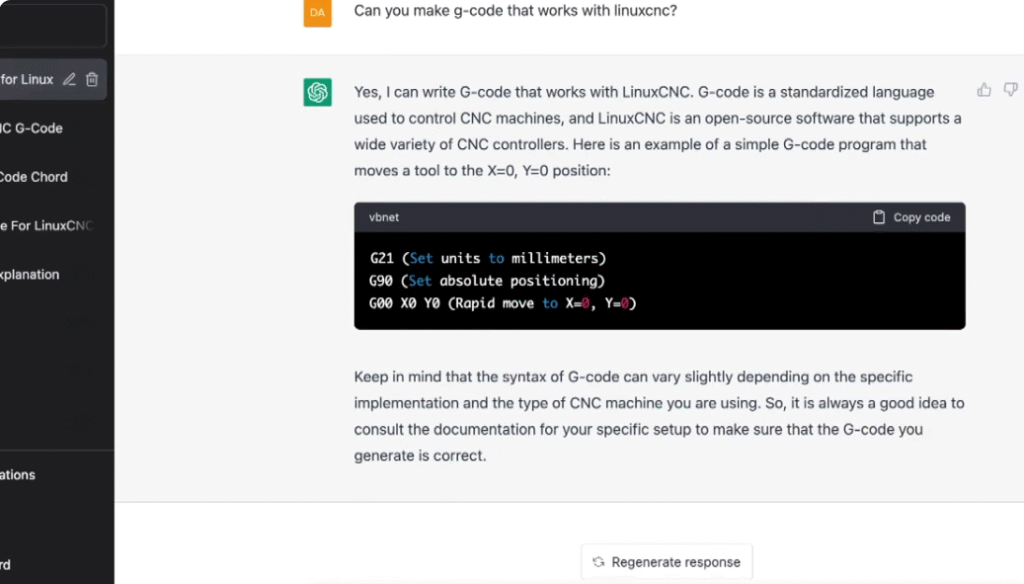
AI-generated G-Code is CNC programming code created or optimized by artificial intelligence. The AI can translate 3D models or design files directly into machine instructions, potentially speeding up programming and reducing human error.
Can AI replace CNC programmers entirely?
Not yet. While AI can generate basic or standard toolpaths, complex parts, multi-axis machining, and critical tolerances often require human expertise to ensure accuracy, safety, and efficiency.
Is AI-generated G-Code safe to use on all machines?
Caution is needed. AI might generate code that exceeds machine limits, ignores fixture constraints, or causes collisions. Always simulate the G-Code in CAM software and perform dry runs before full production.
How accurate is AI-generated G-Code?
Accuracy depends on the quality of the AI model, input files, and machine setup. AI can reduce programming errors but still requires verification, especially for high-precision or critical parts.
What are the limitations of AI-generated G-Code?
Limitations include:
Difficulty handling complex multi-axis operations
Potential collisions or over-travel issues
Limited understanding of material-specific behaviors
Requires human verification to ensure safety and quality
How can I integrate AI-generated G-Code into my workflow?
Typically, you would:
Input a 3D CAD model into an AI-powered CAM or code generator.
Review and simulate the generated G-Code.
Adjust feed rates, toolpaths, or tooling as needed.
Test on the machine with a dry run before production.